

far cry 4 no sound

Far Cry 4 No sound Fix

I must first say that Far Cry 4 is an awesome game thats very immersive but one thing right after installing this game that can ruin the experience is the very annoying Far Cry 4 no sound problem where the Audio simply cuts out during the intro movie clip right were you are captured and a bag is placed over your head by the main villein that takes you to dinner in is palace, from that point on you will not be able to hear anything although the game plays fine, even after taking control of the main character.

The Issue

No sound during far cry 4 intro or sound cuts out half way through the intro at the start of the game. This no sound issue also continues into game play and may arise anywhere through out the game.
far cry 4 no sound
Sound Cuts out during Intro and into Game Play

How to Fix the Far cry 4 no sound issue?

far cry 4 no sound

To fix this annoying issue on your PC is quite easy, and for reference if you have other games that have the same thing happening this fix should work for them too. To fix this issue:

1. Update your :DirectX End-User Runtime. Simply allow the runtime to download and then run the installer which will update with all the past modules.

The above should fix the issue but if it does not then also try the second option:

2. Set your current sound setting to Stereo and disable Dolby Audio. To do this go to your system tray beside the time in the bottom right of the screen and launch your audio control manager e.g. Realtek and disable 5.1 surround sound or whatever you may have it to and select stereo.
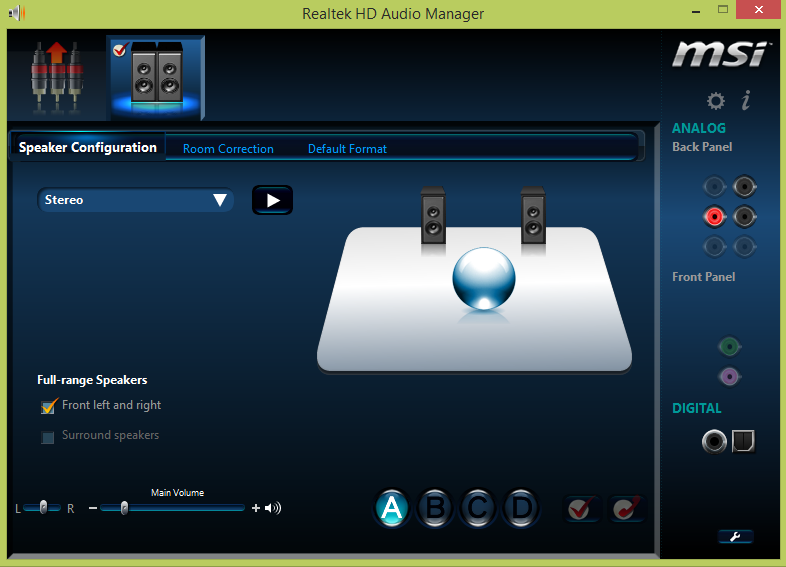
far cry 4 no sound

or

Go to control panel and select sound, then the properties of the speakers by right clicking, then click-through the tabs until you find the Dolby sound option and disable it and that’s it.

Now you can get back to gaming and have some fun, if this was helpful please take the time to spread the word by leaving a comment that may help a fellow gamer that is having the same issue, after all we are stronger when we all work together.


Comments

11 responses to “Far Cry 4 No sound Fix”

  1. I’m still stuck with the same issue…. I’ve an updated version of Directx11 and have changed my sound setting im using laptop so It was already set to stereo speakers…. Plz help me out plzzzzz i want to hear my bullets.. plzzz

    1. I am not sure what you could be missing, but ultimately this may be some driver that’s outdated and needs updating if its not a setting so I suggest you update everything you can think of, Direct X run time environment and all.

  2. Abhimanyu Avatar
    Abhimanyu

    hey , tried it out , dint work , do i have to update my pc to windows 10 ? i had installed 10 earlier but it screwed up other functions in my laptop so i had to dump it , how can we solve the problem ? can steam help?

    1. The suggestion above usually works. Also if you don’t have steam installed it would not hurt to install it or any other driver software or run time environment that games need to function. In all my time playing games if one does not work its usually because something was not installed that it needed or something needed to be disabled (or enabled) as it was not supported.

  3. Thanx man. Yep ,it worked very well.

    1. Happy for you man, have fun palying your game.

    2. Happy for you man, have fun playing your game.

  4. Teguh Suyodono Avatar
    Teguh Suyodono

    I have same issues,,,I played without sound,,,
    and I try the first way
    1. Update your :DirectX End-User Runtime. Simply allow the runtime to download and then run the installer which will update with all the past modules.

    and it’s worked,,,,

    thanks you ,,,,

  5. I had this problem with Ghost Recon Future Soldier too….
    just update your direct x sdk and you are good to go..

  6. Thank you so much . installing Direct X end-user run time worked for me . Have a great day . ๐Ÿ™‚

  7. ko nim Avatar
    ko nim

    tnx!!

๐Ÿ™‚ How well did I do? Take a moment to leave a comment.

This site uses Akismet to reduce spam. Learn how your comment data is processed.