
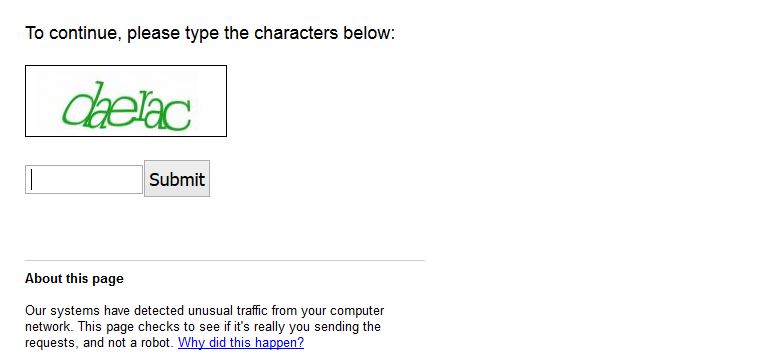
I recently had the displeasure of getting the following message while performing a Google search: our systems have detected unusual traffic from your computer, if you are like me and every one on the planet you really start wondering just about now what this message actually means by “unusual traffic” which is left open to interpretation. You will also get a captcha to fill in before you can continue with your Google search that you will need to fill out to prove that you are actually a human being and not a mindless robot trying to spam Google search by sending or generating a lot of search queries.
What is causing this issue?
As the warning says your system could be sending Google an abnormal amount of requests that would not be possible for a single user and so there are a number of possible reasons for this:
1. Your computer is infected with a nasty virus that’s making the requests in the background that you are not aware of.
2. A plugin or Add-on that you use in your browser of choice that you installed recently is making a lot of requests thus the warnings.
3. Your ISP has placed you and a number of other customers on the same external IP thus making it appear to Google that all the traffic is being generated by one user and thus the warning message.
What does the notice look like:
The message reads: Our systems have detected unusual traffic from your computer network.This page checks to see if it’s really you sending the requests, and not a robot.
It also goes on to give a number of reasons why this could be happening. Along with your IP address in a line below the message. This is hardly helpful as it only leaves you with more questions than answers.
How to Potentially Fix the Issue?
Now to fix the issue here is what you can do :
The obvious and most straight forward thing to do is to actually fill in the captcha code that will be generated randomly it may take a few seconds but you can go on with your search and it may only reappear another time for the day at which point you will have to fill it in once more. But you will be good for about 24 hours after that. If that’s only a temporary solution and you need something more permanent then try these tips:
1. If a Virus is causing the issue then I suggest that you get a reliable antivirus or virus removal tool and scan your PC such as this one here that offers a free version. If it finds something and removes it or fixes your problem then you are good to go.But if it does not then go on reading.
2. Go to the options menu on your browser and go to plugins, extensions or add-on and look and disable any recently installed plugins and see if the problem persists. Watch out especially for SEO plugins if you are a blogger or SEO specialist as some SEO plugins make a lot of requests to gather website information and could be causing your issue.
3. If all else fails then contact your Internet service provider and tell them your issue and find out how they deal with assigning IP addresses and see if they can help you out.
I hope you have all but eliminated this annoying message especially if it’s the first time you are sing it. Its annoying but not totally impossible to fix. Please share your comments below and consider sharing this article.


🙂 How well did I do? Take a moment to leave a comment.