
Today I have a very cool tutorial as I will be showing you how to repair imei number in android which can be a essential skill to have in cases where you are having issues with your IMEI number which makes it impossible to use your cellphone providers network, this can happen too after flashing your phone with a new ROM and you need to restore the original IMEI number of your device to continue to use your phone this tutorial will show you how to do this.
Description of the Issue
Phone cannot connect to your cellphone carriers network when the SIM card is installed or you are getting errors related to your IMEI number. A weird symbol may also appears next to the signal bar indicator that usually shows network strength.
What devices will this repair Imei work on?
This will work on any or most Android phones that can be found in circulation and that includes the Samsung Galaxy phones and those who have flashed their BLU phones and are having the issue where they have put their SIM cards in and they are not detecting their carrier network due to the lack of a IMEI.
What will you be doing to your device?
This fix involves using MTK Droid Tools to repair IMEI of your affected phone by restoring or replacing the IMEI number.
Why did my IMEI need repair?
Sometimes after flashing a new ROM the IMEI thats stored in your device gets erased and you will need to restore it, in other cases it can get erased or start to give issues and that’s why you may be in the situation you are in now.
What will we need for this fix?
For this fix we will be using:
1. The affected phone.
How to repair IMEI number in Android?
1.Download the latest edition of MTK Droid Tools and open the folder and click on the Icon of the Green Android, be warned that some Antiviruses will give a false positive to this tool as being a Virus its not as this is a widely used tool so add it to your exceptions list in your Antivirus.Also take a picture or write down the IMEI information that’s found in the back of your device make sure to get the IMEI 1 and 2.
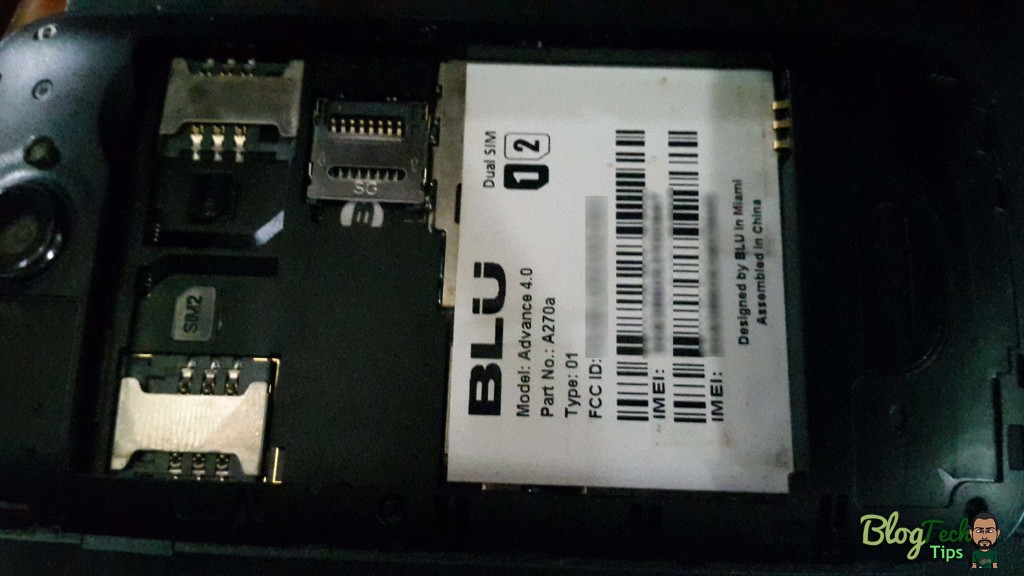
2. Now connect your phone that must be rooted and make sure USB debugging is on in settings developer options.
3. The phone information section will be blank at first but once the phone is detected it will be populated with your devices information make sure to read it that its correct. If your IMEI number 1 and 2 is blank its OK in this case.
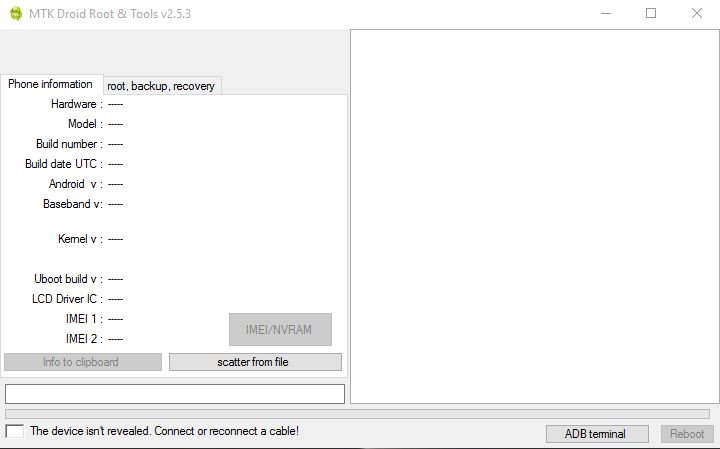
4. Now once your device is connected and good to go click on Root button and you may be asked to grant super user permission on your device’s screen that’s connected, you can click yes to any pop ups on-screen about establishing SU.
5. Allow the process to complete there will be a progress bar in the lower left that should show green.
6. Next click on : IMEI/VRAM button.
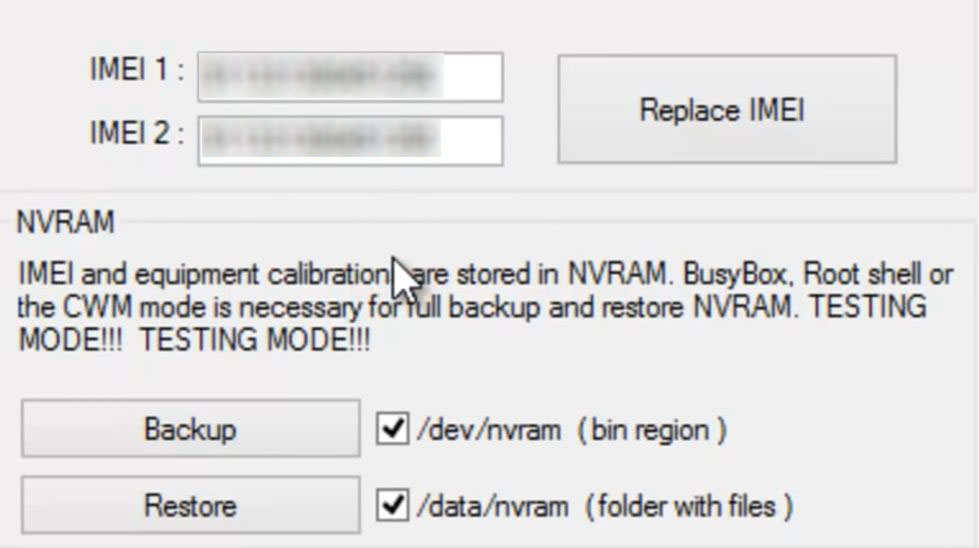
7. Look back at the picture or the numbers that you recorded earlier and input the IMEI numbers that were erased from your phone.
8. Hit replace IMEI and when asked to confirm make sure the numbers are correct and go ahead and click yes.
Your phone should reset and the setting will take effect after. If your SIM card was not being accepted because you had earlier flashed your phone it should now detect as the IMEI number has been replaced in your device.If you were having other issues relating to your it should be easy to check and verify that the number is correct or correct it.
Related Articles:
How to backup and restore your IMEI number?
This step is optional and can save you have to manually input anything in the future as you can keep the file and restore at any time that will be generated below:
1.You should already have the MTK Droid Tools as above which should be launched.
2. Now connect your phone that must be rooted as above and make sure USB debugging is on as in the above situation.
3. The phone information section will be blank at first just like above you only need to make sure its correct when the info shows up.
4. Now once your device is connected and go click on Root button and if you have done this already as above then skip this step.
5. Next click on : IMEI/VRAM button and uncheck the check box beside backup thats says: /dev/nvram (bin region) and then click backup. A file will then be generated with the extension .tar, you can see the full name in the right panel.
6. To restore or when you want to restore: simply click on Replace IMEI and uncheck the box as in 5 above again and this time click on Restore and select the .tar file and allow it to install.
7. A prompt will appear to reboot and disconnect your phone.
I also suggest that you do a backup of your phone or the ROM in case something were to happen that should brick your device you can easily restore.
So that raps up this article on fixing or replacing your phones IMEI number which your smartphone needs in order to work with your network to make and receive calls along with texts messages and surfing the internet. Do leave your comments below and remember to share this article.


🙂 How well did I do? Take a moment to leave a comment.