
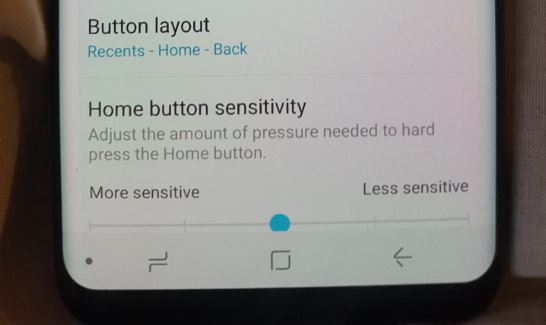
So guys I am still working on the review of the Galaxy S8 as mentioned in the last article with the unboxing but I thought I would do an article on the Galaxy S8 Hide Navigation Bar Update that I got right after updating all my Apps and the phone itself.This was just after removing my Galaxy S8 SM-G950FD from the box. It was a pretty interesting experience so let me log the things that I noticed before and after updating. As the update affected the functionality and look of the device a whole lot from the state it came in.
Before the Update
Before the update and right out the box my Galaxy S8 was running Android security Patch level which was dated 1 May 2017, Android 7.0, Samsung Experience version 8.1, Build Number :NRD90M.G950FXXU1AQEB.
The Update:
The Software update Version seemed to be several updates in one seeing it was the first time the phone was being updated. The update version was: G950FXU1AQG5/G950FOXM1AQG5/G950FXXU!AQG5 and was a whopping Size of 756.62 MB. You will need a very fast internet connection or some major patience for the update to finish everything on a slower connection. Luckily I had access to a very fast connection and the update was complete in about 7 Minutes give or take.

In the Whats new it indicated: Stability improvements for the camera and wireless charging but from what I saw seeing it was several updates other things were also improved which I have outlined below including the Hide Navigation bar update and more. By the way my Galaxy S8 is the international unlocked DUOS model SM-G950FD and this should also apply to the Galaxy S8+ and other versions of the Samsung galaxy S8.
After The Update
After the update the Galaxy S8 is now running Android security Patch level which was dated 1 July 2017, Android 7.0, Samsung Experience version 8.1, Build Number :NRD90M.G950FXXU1AQG5.
What has changed?
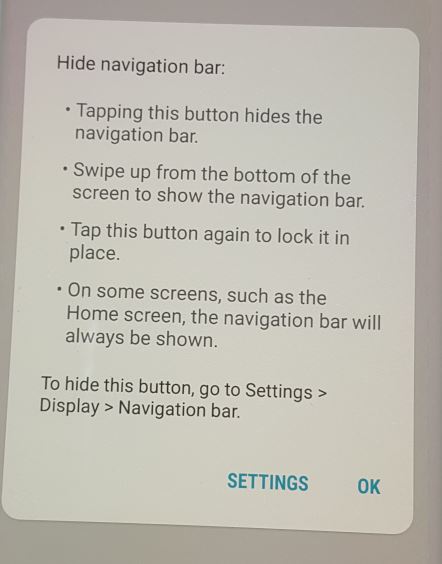
1.The most noticeable improvement since the update is the addition of the Hide Navigation Bar button on the Navigation buttons at the bottom of the screen in the bottom left. To learn how to use the new feature read this article here.
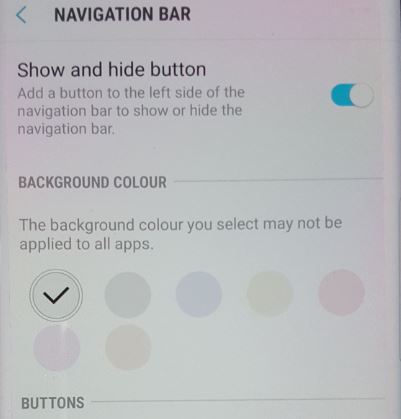
You are no longer able to change the color of the Navigation bar to whatever you want as before and you can now only select a few lighter predefined color options and the color wheel is gone.To find the options go to Settings-Display-Navigation bar.
2.Also it seems from reports this update or one of them in this set is aimed at disabling the ability of users to remap the Bixby button using some third party software methods that are out there.
3. The Galaxy S8 ability to take Panorama photos has improved. The method the Galaxy S8 uses for these photos is to stitch the pictures together, so the user simply keeps the camera level and moves it across the Sean they want to capture.
4. The general performance and speed improvements are welcomed as well. The device moves really snappy and I have no complaints. So Samsung must be doing something right with these updates making the S8 a joy to use.
My Thoughts on these Updates:
Overall I like the improvements Samsung has made through the updates to the S8. The security patches rolled out quite quickly and its good to know that my device is more secure than ever. The hide Navigation bar button now adds to the immersion and I can really enjoy my apps in full screen without any distractions which is one of the cool reasons to actually having an infinity display.
I don’t like that the color options wheel is gone and I am now limited to a few colors but seeing it was right after getting the device out the box it can be forgiven, but the option would have been nice.Who knows what improvements will be included in future updates but I am looking forward to these updates as they roll out.
Did I miss anything?
It’s quite possible I missed something in these updates. If you noticed anything in the latest updates that’s not documented here could you please leave a comment below informing both me and our readers. Remember this is a community and your input is highly valued so lets start a conversation. You can even take it a step further and share this post as well. I am Ricardo Gardener the author of this post and I will be waiting for you in the comment section.


🙂 How well did I do? Take a moment to leave a comment.